Logo Migrate
Logo da empresa
Solutions
Cases
Developers
Support
Resources
Login
Contact Us

The complete solution to boost your business

With InvoiCy, we combine performance, security, and scalability to simplify your tax management and accelerate your growth!

InvoiCy

HomeOutbound NFS-eInbound NFS-eOutbound SefazInbound SefazOutbound GNRENF-e, CT-e & MDF-e Web FormNFC-e & NFS-e DashboardNF-e & NFC-e ComplianceDigital CertificateE-mail DeliverySmart OCRMunicipal Tax ContentWhite Label PlatformAPI & Integrations

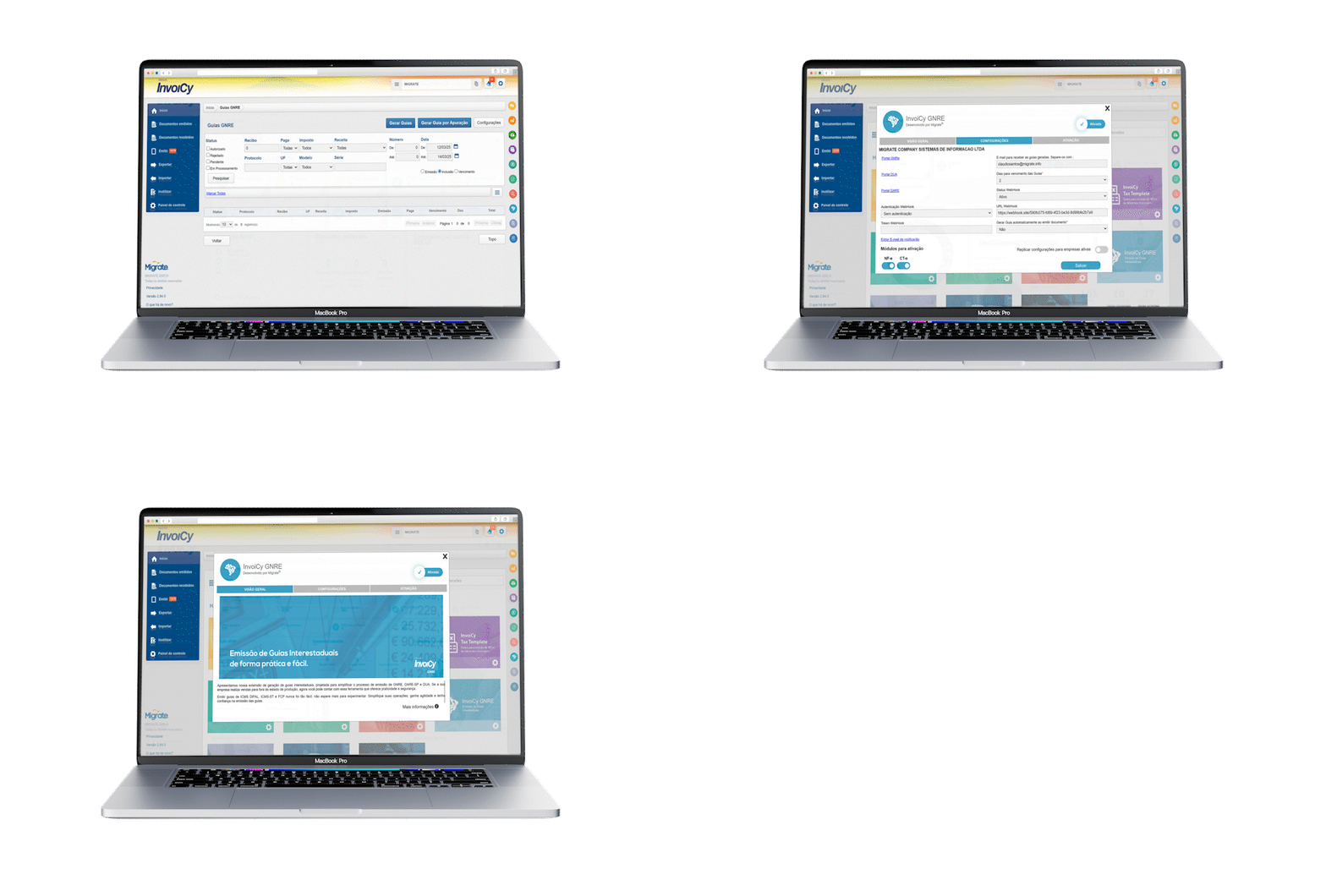
InvoiCy GNRE: automate GNRE issuance with ease

Eliminate manual processes and ensure faster tax payment. Issuing GNRE manually means wasting time accessing different state systems, dealing with slow, error-prone processes.
With InvoiCy GNRE, you automate issuance, ensuring speed, accuracy and security—no hassle!

Automated issuance

Generate GNRE, DARE-SP and DUA with a few clicks, reducing errors and time spent on manual entry.


Accurate tax calculation

Ensures correct values for ICMS DIFAL, ICMS-ST and FCP, avoiding errors and tax penalties.

Centralized management

Monitor due dates, payments and guide status in a single dashboard, avoiding oversights and delays.

Direct integration with states

API to connect to state systems, enabling issuance without hassle for SP, PE and ES.

Sync with your ERP

Automate import and posting of payments, reducing rework for accounting and finance teams.

Management reports

View all issued guides, ensuring transparency and organized tax management.

Advanced features for efficient GNRE management

  • 1

    Integration API for generating and querying guides in ES, PE and SP.

  • 2

    Automatic generation of GNRE, DARE-SP and DUA with no hassle.

  • 3

    Complete reports to track taxes paid

  • 4

    Easy payment and control of due dates.

  • 5

    Secure and reliable process, reducing errors in entry and submission.

How to use InvoiCy GNRE?

Implementing InvoiCy GNRE is simple and fast. Follow the steps below to automate your tax guide issuance with no hassle.

  • Log in to InvoiCy, enable the GNRE extension and configure states and company data. Customize fill rules as needed.

  • Set up automatic generation so the GNRE is issued with the tax document, or issue manually from the GNRE Guides screen.

  • Track all guides in the control panel. If there is a rejection, the system shows the error for immediate correction.

  • After authorization by SEFAZ, download and print the guide directly in the platform or set up automatic email delivery.

  • Generate full reports to track due dates and payments, ensuring efficient tax and financial control.

  • Activation and initial setup

    Log in to InvoiCy, enable the GNRE extension and configure states and company data. Customize fill rules as needed.

  • Automatic or manual issuance

    Set up automatic generation so the GNRE is issued with the tax document, or issue manually from the GNRE Guides screen.

  • Query and correction

    Track all guides in the control panel. If there is a rejection, the system shows the error for immediate correction.

  • Download and print

    After authorization by SEFAZ, download and print the guide directly in the platform or set up automatic email delivery.

  • Reports and monitoring

    Generate full reports to track due dates and payments, ensuring efficient tax and financial control.

DONE! YOUR COMPANY CAN NOW GENERATE GNREs AUTOMATICALLY, SECURELY AND EFFICIENTLY!

Ready to get started?

Automate GNRE generation now! Request a free demo and see how InvoiCy GNRE can simplify your guide issuance.

Frequently Asked Questions

  • Yes! The extension lets you set up automatic guide generation when issuing an NF-e or CT-e that requires GNRE. This can be configured in the extension Settings tab.

  • Yes! InvoiCy shows the rejection reason when you hover over the "Rejected" status. To fix it, go to the screen, select the rejected guide and generate a new one, adjusting the required fields.

  • If issuance is via webservice, you don't have to register revenues in InvoiCy, as the data can be sent directly in the request. If not sent, InvoiCy will use the registered settings to avoid rejections.

  • When the GNRE is authorized by Sefaz, it can be downloaded and printed directly on the "GNRE Guides" screen. If an email is configured, InvoiCy can also send the guide automatically.

  • Yes! But to generate multiple guides at the same time, all selected documents must have the same tax type, as the entered information will be applied to all guides in the batch.

Still have questions?

Migrate - Plataforma de Migração de Dados
Nos contate por emailSiga-nos no InstagramSiga-nos no LinkedInSiga-nos no YouTube

Sobre

  • Sobre nós
  • Carreiras
  • Cases
  • Política de Privacidade

Invoicy Brasil

  • Home
  • Emissão NFS-e
  • Captura NFS-e
  • Emissão SEFAZ
  • Captura SEFAZ
  • Emissão GNRE
  • Digitação NF-e, CT-e e MDF-e
  • Dashboard NFC-e e NFS-e
  • Compliance NF-e e NFC-e
  • Certificado Digital
  • Mail
  • Leitura OCR
  • Tributos Municipais
  • Interface Customizada
  • Formas de integração

Recursos

  • Blog Brasil
  • Reforma Tributária
  • Atendimento
  • Contatos
  • Desenvolvedores
2026 Migrate - Todos os direitos reservados.
Em conformidade com a LGPD
Migrate Brasil
R. Padre Cacique, nº 985 - 2 piso
98910-000 - Centro - Três de Maio - RS

Talk to a specialist

InvoiCy GNRE: automatize a emissão de GNRE com facilidade